My interest in LLMs for coding assist tooling started before the virality of GPT. Back then I tried this extension in vscode called Tabnine which provided “smart” auto-completion while writing code. It was heavy, vscode felt sluggish and the fans whirred louder, but the thing felt like magic sometimes. Half the time, the suggested completions were completely off, but the other half it felt like it was reading my mind. I enjoyed this experience because there was no friction between accepting or ignoring these completions and it sped up going from idea to implementation.
I kept using tabnine until early last year. The rate of change was constantly speeding up and this LLM-assisted coding wave was beginning to make a deep throbbing hum behind the creaking bloated stack of mostly low quality code underneath most of our software.
Vibe enters the chat
When “vibe” coding was coined, I didn’t care much for it. I mostly used free LLMs to do small atomic tasks outside my IDE, it was amazing at generating bootstraps for anything. Last year I wrote a python utility (with LLM help) that I dubbed “The Reviewer” which I can point to a code file and it would toss it to one of the free LLMs available via OpenRouter (my favorite was Gemini 2.5 at the time) to run a review and generate a markdown report. Most of the reported items were “imagined” issues due mainly to not sending the LLM the full context (ie the entire project) or simply hallucinated, and sometimes.. it actually led me to real issues.
For the most part, the real vibe coding was limited to the latest Claude and GPT, hundreds of dollars spent on tokens every month, then every week, then got into the thousands.. I was disinterested in that whole sphere mainly because I couldn’t afford it and was not keen on adding yet another enshitifying dependency I do not control into my everyday coding.
Barriers
I’ve always believed since the beginning of this that the future of LLMs is not in the frontier models, but the open weights models. Especially the ones that can run perfectly well on consumer hardware. But the gap in competency was massive.
While the latest Opus was vibe coding entire apps, the best we could run on our anaemic 8GB VRAM GPUs were tiny 8B models with 8092 contexts that aren’t good for anything useful. Either NVIDIA/AMD accidentally throttled down consumers access to LLMs, or they deliberately did it, the result is the same.. we’re stuck mostly on 8GB GPUS. And then when this deliberate capping of VRAM was getting too old, we enter the RAM crisis. And it looked bleak.
I believed that we’ll never really have competent local LLMs in this decade, not until shared memory PCs with 64GB+ become the affordable and abundant (Eyeing Mac M4 and Framework PC minis).
At this stage, there’s a very clear plateauing of frontier models progress. This allowed open weights models to begin to catch up very gradually in competency and context sizes while being pinned down to around 8GB-16GB VRAM due to most of us being stuck there.
Context was the big problem. Until it isn’t no more.
When Gemma 3 models came out, I couldn’t believe it.. Open weights models, small enough to run on my current PC, with a context that can go up to 262K! how is this even possible?
But when I tried them locally, I can tell the competency level required for handling complex tasks was still very far. I could run the dense 27B model on my 8GB GPU, but the speed was horrendous. Gemma 3 4B/12B were delightfully faster, but had the competency of a toy.
That was nearly a year ago.
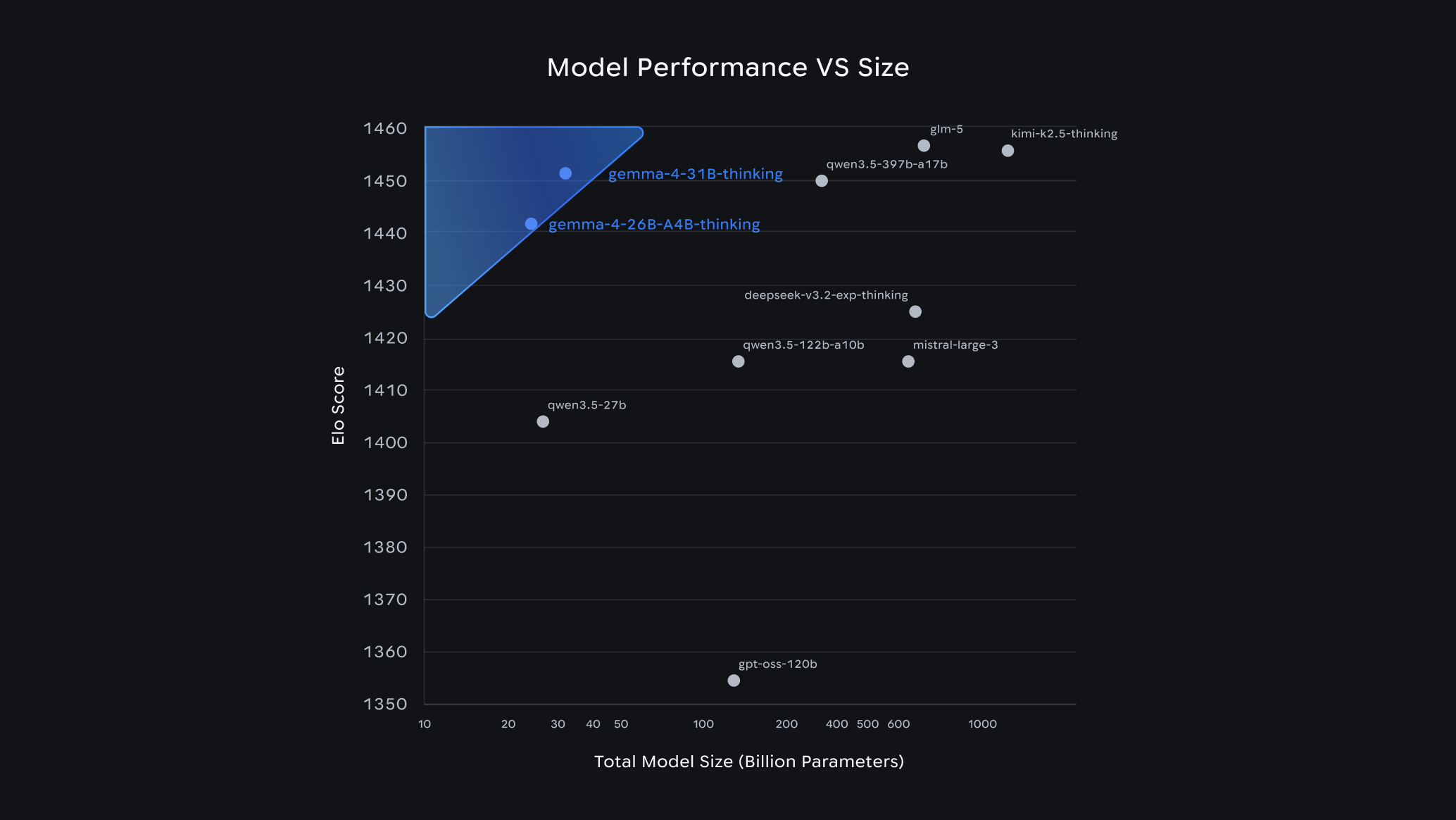
Then a month ago, April 2026, Gemma 4 came out. One of the G4 models (26B A4B MoE) stood out as very strange, looking at their benchmark chart there I noticed that GPT-OSS-120B was below the 31B and 26B Gemma 4 models in ELO rating.. 😱
This model, the GPT-OSS-120B, was the model that I felt sad I didn’t have access to hardware I can run it on because it felt like it’s competent enough to be usable at the time of its release. It wasn’t even that old in my view (ancient in LLM time though). And these new models that are 1/4th the parameters? are at least in some benchmarks, better!
I quickly download and ran the 31B Q4_K_M quant of 31B and I’m delighted to discover that these models are indeed competent enough and the context is an incredible 256K! however, it was still slow.. still needed at least 24GB of VRAM for the dense model to not get bottlenecked.
Then I tried the strange 26B-A4B and I was shocked. It was, fast on my PC. And while there’s a hit to competency compared to the dense 31B, it felt usable.
In my view, the barriers have finally fallen.. 🧱⛓️💥
Beyond the walls
For the following week I experimented on 26B-A4B, I found the brittle edges but it was indeed competent and fast enough to be usable.
Then I saw this other model pop up on OpenRouter models list with the same subset activation feature, the Qwen3.6 35B A3B.. an even larger model with an even smaller activated subset released like 2 weeks after Gemma 4.
I quickly downloaded it and tried it. I was shocked.. just weeks after G4, and with this one? I couldn’t find the brittle edges!
Somehow, the Qwen3.6 35B A3B model just broke through the competency threshold into clearly usable territory.
On Mastodon I shared a small benchmarks comparison between it and comparable commercial models at this time:
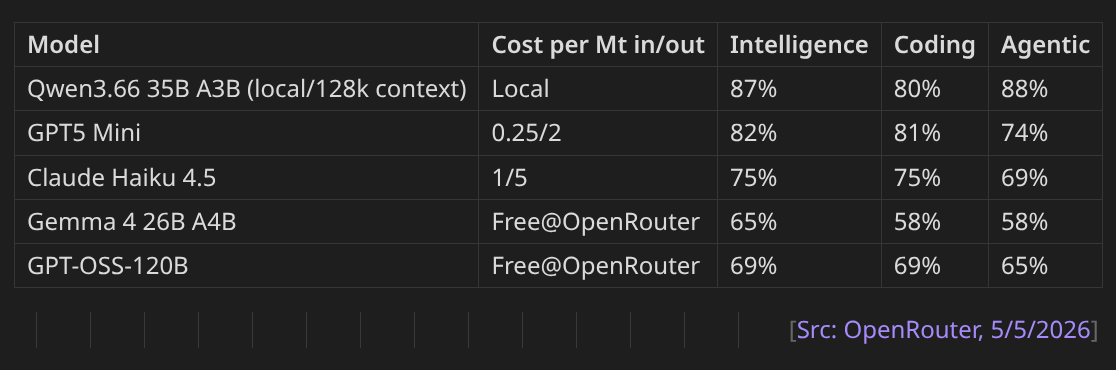
I am so happy that I can finally run an open weights model on my local 6 years old gaming PC that exceeds the competence of even GPT5 Mini! what a crazy concept. And it’s actually pretty fast, if I configure it with 128K context I could reach 20+ tokens/s.
Official Qwen3.6-35B-A3B blog post.
Well I guess it’s time to dive into LLMs..
The Mechanic
I want to understand everything. What’s quantization? What’s a KV cache? how do I make this thing faster? What’s an MCP and how do I make and host one? how do I extend the context with minimal quality loss? etc.
So over the last 10 days, I’ve been cooking. Or at least learning to cook.
First, I switched from ollama to llama.cpp after I read a comment online that ollama has a significant performance killing bug they refuse/or dont know how to fix. I thought it won’t hurt to try so I tested llama.cpp and discovered to my shock that it was real.. ollama sucks.
From a quick launch from llama.cpp with leaving almost everything on standard, I got a 64K context Qwen3.6 starting its processing at over 30 tokens/s! A massive speed up compared to ollama. I didn’t quite understand why llama.cpp was showing 64000 as context size until later.
The first problem was the context, I wanted at least 128K. There’s a lot of people sharing their launch parameters on reddit but as I learned more about this stuff I realised most of the suggested parameters you find online aren’t informed.
I needed to learn a lot of things about contexts (llama.cpp version b8827):
Which Quantization is best?
There are many quantizations you can find for Qwen3.6 including ones I’ve never seen personally. Unsloth is basically the standard in Quantizations and Unsloth’s docs are pretty solid too.
My system has 32GB RAM with an 8GB RTX 3070 Ti (Ampere).
The following is my best conclusions as of now:
- Generally stay away from Q3 and below. Also Q4_K_S may suffer further degradation due to this model being MoE
- For this model, if you have 32GB RAM the size of the model itself is secondary because it’ll never need to be fully loaded to VRAM (unlike all other dense models), only a subset of parameters will actually be loaded in VRAM (around 3B). The other major user of VRAM is the KV Cache.
- Q4_K_XL is still the king of Q4, apparently better than Q5_K_S
- Q4_K_M is still the standard safe quantization, however because this model is a MoE with subset activation, other types might be more optimal than “K”. Unknown at the moment.
- IQ4_NL_XL and IQ4_NL both are newer and provide comparable quality to “K”. From what I can find, IQ4_NL is definitely better than Q4_K_S. While IQ4_NL_XL might be equivalent or slightly better than Q4_K_M. Best part? NL quants are smaller in size. Worst part? NL is more expensive at runtime, 10%-15% performance impact compared to K.
- MXFP4_MOE: I wanted to try this one. It’s optimised specifically for NVIDIA hardware and MoE models. It’s very new and information about its quality gain are disputed. Unfortunately I discovered that NVIDIA Ampere doesn’t support FP8/FP4 in hardware ☹️ So this is not possible to run optimally for me (needs RTX4000+).
Regarding MXFP4, there’s at least one working attempt to simulate it on RTX3000 (and other GPUs): SuriyaaMM/feather.
For the standard 256K context size, I settled on running Q4_K_XL since the actual size of the model is secondary as long as there’s enough system RAM to hold it.
If I ever need to run 320K-512K context, I’d switch to IQ4_NL_XL because the KV Cache will be partially stored in system RAM contending with the model leading to a significant performance impact.
Contextual Relevance
You specify context with --ctx-size or -c. But
Is specifying -c 128000 a suggestion, limiter, or beyond?
It actually directly specifies the size of the KV cache allocated in memory which prioritises the compute device memory. How this cache is used is a different topic, so if my parameters were misconfigured (they were) it might lead to utilising only a portion of the actual allocated cache wasting the rest.
Cashing KV Cache
What’s this KV Cache? well it’s essentially a loooong list of Key->Value data that the model stores the context tokens in. The default format used to store the data is f16 for both key and value.
Before anything, if you’re running on an NVIDIA GPU, f16 is not optimal. Use bf16 instead.
But regardless, f16/bf16 are overkill since memory usage is the major bottleneck for us.
llama.cpp allows specifying different quantizations to be used to effectively compress the KV Cache. This means your LLM can run double or more the context length while using the exact same memory! This is the easiest win to reclaim some memory back or stretch the context to the limit with minimal impact on quality and coherence.
But wait a second, why does llama.cpp allow different quants for K and V? Turns out, K is significantly more sensitive to degradation as the context grows so needs to have a good quant. While V isn’t as sensitive and can use a smaller quant:
- f16: default quant, no degradation, not most optimal for NVIDIA
- bf16: no degradation, optimal on NVIDIA
- q8_0: no noticeable degradation, this is an easy win! by just setting:
--cache-type-k q8_0 --cache-type-v q8_0the LLM will use half the RAM for the KV Cache - q5_0: don’t use this for K, but can for V
- iq4_nl: newer, slightly smaller than q5_0 possibly at similar stability? no idea
Unfortunately for me using q5_0 or iq4_nl always leads to a crash before LLM starts with memory full error. I think this is either a bug or these quants require RTX4000+.
Regardless, I use q8_0 for both K and V now as I didn’t notice any difference in quality compared to bf16.
Contextual YARNing of RoPEs
If you casually follow LLM news as I do, you’d have heard about YARN and RoPE. Combined they allow extending positions in the KV Cache which is where the model’s working context is stored so this is critical for extending models context beyond their native.
Note that this doesn’t mean KV Cache becomes smaller. It won’t save any VRAM. This was confusing to me. Basically its only to massage the model so that it can use longer contexts than its native length.
Qwen3.6 native context is 256K (262144 tokens), but can go up to 1M (1024000 tokens) using yarn and rope.
Here are the main llama.cpp parameters to set compression:
- rope-scaling: specifies the scaling method used, “linear” by default. Set to “yarn” to enable yarn.
- rope-scale: the factor of scaling, 2 means 2x context, 4 means 4x context. Fractional scaling is supported so can set it to 1.25 for 320K context for example.
- yarn-orig-ctx: safest to not set this (it gets read from model metadata by default), it was not clear what it means but it’s basically the native context of the model. In Qwen3.6’s this must be: 262144, I included it here because I found it set to wrong values online.
That’s it. Oh One last thing..
DO NOT ENABLE YARN unless you specifically need more than 256K context. There’s literally no point enabling it at native context length! it’ll actually degrade quality of the model and raise the chance of LLM getting confused (called perplexity).
Temperature and Penalties
Qwen3.6 is a full reasoning model. It reacts to sampling parameters a little differently.
The recommended llama.cpp parameters are:
- Thinking mode for general chat:
--temp 1.0 --top-k 20 --top-p 0.95 --min-p 0.0 --presence-penalty 1.5 - Thinking mode for precision/coding:
--temp 0.6 --top-k 20 --top-p 0.95 --min-p 0.0 --presence-penalty 0.0
I’m only interested in the coding side, in my tests of the official recommended parameters I ran into a situation where the reasoning gets stuck in an infinite loop until it gets cut off for exceeding the model’s 32768 output tokens limit. I was able to reproduce this consistently.
This issue is mentioned in the Unsloth docs for Qwen3.6, and the recommended fix is to raise the temperature to 0.65-0.75, and the presence penalty to < 2.0.
I tried temperature 0.7, and it solved the problem for me. Didn’t need to raise presence penalty. If it occurs again in the future, I will raise the penalty.
Other Important Params
- Output tokens limit (
-n): specify the output tokens limit (to prevent infinite reasoning), the model native value for this is 32768, I leave as is. - Number of layers to offset to GPU (
-ngl Nwhere N is an arbitrary large number >=99): you’ll find this flag in almost every suggested parameters set out there as if its religiously required, DO NOT use it otherwise it’ll force Qwen3.6 35B-A3B to operate like a dense model! by design it doesn’t need everything in VRAM at the same time. let llama.cpp manage this to unlock full tokens/s speed. - Chat template (
--jinja): use the chat templates specified in the model metadata, no reason to not use it. --parallel 1if you’re a single user like me, setting this presumably uses less memory. It doesn’t prevent multiple users, just will limit its active processing to one prompt at a time (so will effectively queue requests when busy).- Context Shifting (
--no-context-shift): this is an interesting one. When the model context is full, the runtime engine will evict the first half of the KV cache and shift the rest up (keeping the first prompt) to allow for infinite chat. Setting this to No, means llama.cpp will stop once the context is exhausted. You should enable this for coding work. - Memory Mapping (
--no-mmap): I’m not sure of the negative impact of this flag for a tight RAM budget like mine, but using it speeds up the LLM a little. Probably safer to not use it. - Other flags should be left alone as llama.cpp uses sane defaults (
-fa,-sm, etc).
Benchmarkening
Here’s my full current stable llama.cpp launch parameters to follow traditions:
Native 256K Context
llama-server                             \
	-m Qwen3.6-35B-A3B-UD-Q4_K_XL.gguf   \
	--jinja                              \
	--parallel 1                         \
	--temp 0.7                           \
	--top-k 20                           \
	--top-p 0.95                         \
	--min-p 0                            \
	--presence-penalty 0                 \
	-n 32768                             \
	--no-context-shift                   \
	--no-mmap                            \
	-c 262144                            \
	--cache-type-k q8_0                  \
	--cache-type_v q8_0
Compressed 512K Context (Yarn)
llama-server                             \
    -m Qwen3.6-35B-A3B-UD-IQ4_NL_XL.gguf \
    --jinja                              \
    --parallel 1                         \
    --temp 0.7                           \
    --top-k 20                           \
    --top-p 0.95                         \
    --min-p 0                            \
    --presence-penalty 0                 \
    -n 32768                             \
    --no-context-shift                   \
    --no-mmap                            \
    -c 262144                            \
    --rope-scaling yarn                  \
    --yarn-orig-ctx 262144               \
    --rope-scale 2                       \
    --cache-type-k q8_0                  \
    --cache-type_v q8_0
I wanted to know the impact of context size, YARN, and quantizations on tokens/s. so I ran plenty of tests with lots of different configurations, in hindsight I should have used llama-bench.. but here’s a useful subset of the data anyway:
Benchmarks for Qwen3.6-35B-A3B Using IQ4_NL_XL quant (19.5GB) on 32GB RAM & 8GB VRAM NVIDIA Ampere:
| Context length | RoPE scale | KV Quants | RAM KV Cache | VRAM KV Cache | Speed |
|---|---|---|---|---|---|
| 131072 | 0 | fp16:fp16 | 0 | 2560MB | <27 t/s |
| 131072 | 0 | q8_0:q8_0 | 0 | 1360MB | <27 t/s |
| 262144 | 0 | q8_0:q8_0 | 0 | 2720MB | <23 t/s |
| 524288 | 2 | q8_0:q8_0 | 3264MB | 2176MB | <13 t/s |
| 1024000 | 4 | q8_0:q8_0 |
Running the Q4_K_M quant looks the same, but +3 tokens/s (due to IQ4_NL’s performance impact).
General guidelines to speed up inference if that’s a priority:
- avoid using NL quantizations, they require more work. K quants are straight forward.
- lower context to 131072 tokens
- use a byte aligned cache type for KV: bf16 or q8_0
- disable yarn of course
- disable memory mapping
--no-mmap - keep LLM to one task at a time:
--parallel 1 - get rich and buy a faster computer with all the RAM/VRAM 💵💻
Completions via Continue
As an aside since I talked about using tabnine completion at the start, recently I tried Continue which describes an auto-completions feature similar to what tabnine used to do. I can run Qwen2.5 Coder 7B perfectly fine on my gaming PC and then hook it up to Continue as the completions provider.
It worked in Codium. But it’s too slow (despite qwen2.5-coder-7b-instruct running at over 60 tokens/s) and I could never get it to suggest multiple lines of code or even a complete single line of code! I’m not sure why, its completions are often cut off before end of line at odd points (for example stops at float6 without even finishing the type name float64).
Might be a good project to cook, a vscode extension focused on efficient and fast auto-completion powered by a local LLM.
Conclusion
Qwen3.6-35B-A3B just changed my computing world. I want to make things with it, for it, and to it.
Yesterday, I was trying to explain what it changed for me to some of my best friends who aren’t into computing but very smart and know GPT better than me, and a particular thing they didn’t buy (thinking I must be delusional or something) is that this model running through my phone that they can talk to actually runs completely locally. And while it can use web search via an MCP, it’s perfectly capable of answering complex queries without “phoning home” to anybody.
They proceeded to apply a serious of abusive tests to it that made me a bit nervous 😂 but it held its grounds. I think because it’s designed for coding (and that 0.7 temperature), when you ask it for information beyond its training data like political things that happened recently, it won’t hallucinate details but simply say: look, I don’t know about this, but here’s what I know.. and proceeds to list the info it actually knows. Honestly, I felt proud 😊