TIC-80 Cheatsheet
- 1 min read
This a self-contained cheatsheet I created for TIC-80:
And a hi-quality PNG:
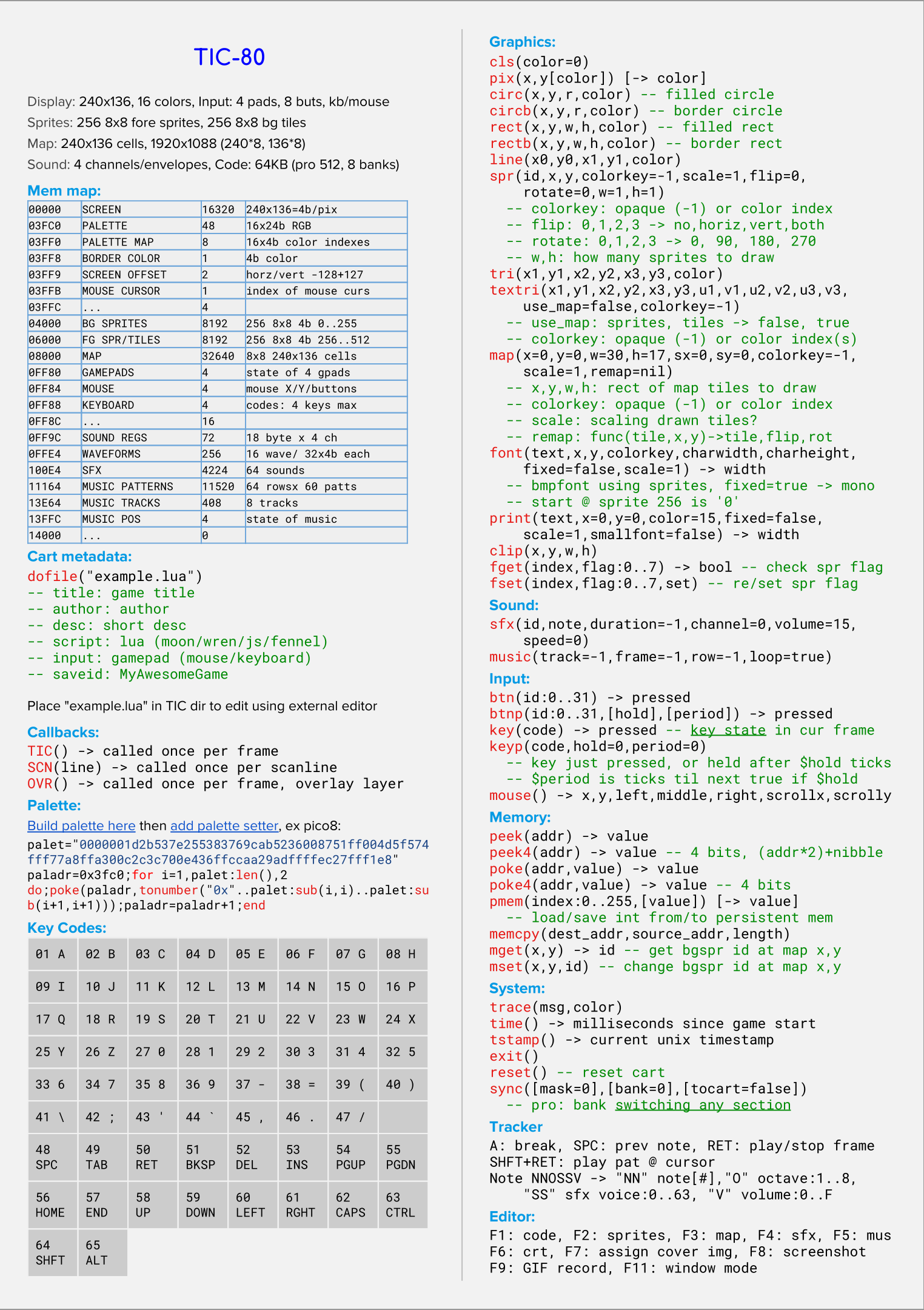
This a self-contained cheatsheet I created for TIC-80:
And a hi-quality PNG:
I resurrected a bunch of old projects done for either fun or while job hunting:
This is a demo made to breath life into a mockup screenshot I found online. Don’t remember where I got the mockup from but I like the vibe :)
Demo is written using javascript/PhaserJS directly on the sadly-ruined-to-milk-for-money-by-amazon website Cloud9. I find it infuriating that rather than supporting the c9 platform and the growing community that used it for small projects, Amazon ate the service and now only allow using it through their hyper-complex-absurdly-massive AWS mess of enterprise stuff.
A while ago I used a simple benchmark to very roughly compare performance on multiple platforms: PC-6002 vs 80s Computers Benchmark and got some interesting results.
Recently I got a Raspberry Pi 4 and wanted to figure out how its new CPU compare to other platforms so I went back to that simple benchmark I used, scaled it up by 1000x and used it in many different ways on many different devices and platforms. I think the results are noteworthy :) but it’s still just for fun, this is by no means a benchmark that should be taken seriously.
Weather not being so nice through this weekend with an upcoming quick 2 weeks vacation where it’s summertime, I thought I’ll do a fun indoors thing on Saturday.
A while ago I set up TIC-80 on NVIDIA Shield TV and hooked up a bluetooth keyboard and mouse, the idea is to do some light gamedev directly on the TV while chilling on the couch. It’ll be like the most relaxed form of development possible :)
When I bought my Amiga A500 from TradeMe it came with a compatible monitor which had some old-monitor problems related to picture quality. I expected that as CRT monitors do tend to deteriote in quality over the years and also tend to die suddenly.
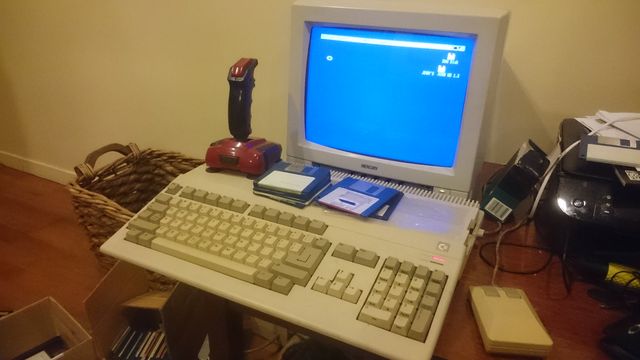
I was not proven wrong as the monitor did die a few weeks later with a click and a whine.
The Amiga A500 has a video-out port but puzzlingly it outputs in greyscale only.
SPRITESR is a work-in-progress sprite library to automate drawing and animating sprites. SPRITESR is written to work specifically with N66 SR Mode 6 Screen 2 (Warka PC-6002, NEC PC6001 Mk2 SR, NEC PC-6601 SR, and NEC Mr PC).
SPRITESR Demo: disk for N66 SR emulator
To run the demo in the emulator, insert floppy disk image, go to mode 6 then type:
COMPILE60 is a simple front-end I wrote in Python/Tkinter to simplify C compilation and linking of PC-6002 projects.
Installation and usage instructions are in the readme.md file: COMPILE60 git
COMPILE60 requires z88dk to work and of course a PC-6001 emulator to run the binaries.
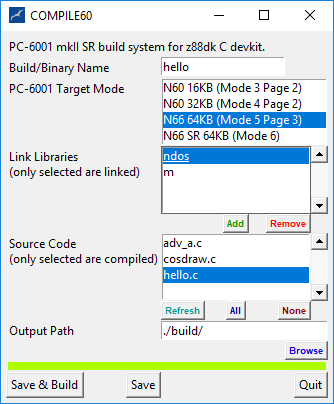
Limitations:
A few planned features to be implemented some day:
I expected a troubled commercial history for the PC-60 due to the limited information about it, but I wanted to understand why and I’ve been researching the history of the PC-60 platform in Japan this last week.
My main source of information was the only related magazine I was able to find online in archive.org, IO Magazine. In every issue starting around page 200 there is an impressive amount of technical information about multiple platforms from that era as well as entire source code listings for software and games for these platforms.
The first utility I wanted to build was a set of tools to convert any appropriately scaled-down PNG to be viewable directly in PC-60 BASIC.
I’ve used Python for the scripts that convert and generate the necessary data plus the 3rd party tool txt2bas.exe available online.
I was able to draw directly using the PC-60 palette using this palette profile I made for Paint.Net, then convert the PNG to a BASIC program for display.
Didn’t have much time last week to finish working on a PNG-to-PC-6001 compressed bitmaps pipeline (next blog post) but I saw this video on youtube and thought this would make a great quick test of performance level for 80s computers! (mostly z80-based) to understand how they compare to each other.
I used the exact same program in the video:
10 FOR I=2 to 1000
20 K=INT(SQR(I))+1
30 FOR J=2 TO K
40 K1=I/J
50 K2=INT(K1)
60 IF K1=K2 THEN GOTO 90
70 NEXT J
80 PRINT I
90 NEXT I
This is mostly a test of the embedded BASIC interpreter rather than the processing power in these computers. I’m sure running compiled assembly code should deliver similar performance since all Z80 PCs are running at the same frequency.